Friday, March 25, 2011

Steps to create a Java program

Steps to create a Java program:
Writing a program with a text editor. Examples tekx editor that can be used include Notepad, vi, emacs, etc.
Storing the results of the program with the extension. java.
Compile the program using the Java Compiler. The result of compilation of bytecode file with the extension. class. This file will then be converted by the Java interpreter into machine language appropriate to the type and platform used.
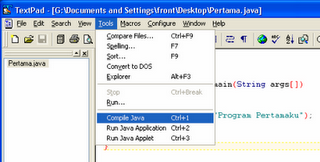
Ok now we try to write simple programs with language. We could use an editor available, such as Textpad, Notepad, and so forth. In this exercise we use Textpad are lighter and easy to implement.

public class First
{
public static void main (String args [])
{
System.out.println ("My First Program");
}
}

To find out how the output of the program we follow the steps - these steps:

Select Tools, Compile Java or Press Ctrl + 1

Next Command Result will appear, usually if there are no errors it will display the main page of programs and messages Tool completed successfully at the command result or the lower left corner of the program.
Having succeeded in compiling, Select Tools, Run Java Application or press Ctrl +2 and output will appear

The first line is the name of the class that we make. the First. Well in java, the writing is case sensitive meaning uppercase and lowercase letters writing will be different. To penamaannya use the extension. java and must match exactly with the class that we make. So we must ngesavenya "Pertama.java".


Java program will run at least one function that is played, the word void in front of it means that this function will not issue a good value (return value). Open curly brackets means that marked the beginning of the command to be executed and should be closed with a cap of curly brackets. So always use curly braces even number.
System.out.println used to create the output. while the sentence that is between quotation marks is a string constant which will be displayed on the screen (output).
READ MORE - Steps to create a Java program

Wednesday, March 23, 2011

The Java programming language API

With the easier use of computers, will be increasingly difficult and complex task that must be done by the programmer. We simply write console-based programs using several subroutines to display the message and take input from the user. GUI (graphical user interface = graphical user interface), such as windows, buttons, scroll bars, menus, text input boxes, and others may be more attractive to users. However, programmers have to deal with the possibility that very very much, and more subroutines that must be made to be able to control every component of the GUI.

Someone who wants to create a program for Windows for example, must use the Toolbox Windows, which is a collection of thousands of subroutines, for example to open and close the window, to draw and write text, add a button and receive a response from the user. In addition there are also GUI subroutines that deal with open, read, and write files, communicate with the network, and others. The point in the toolbox are all things that we think is standard. Apple and Linux have their own toolbox that is different from that provided by Windows.

Each project of the program will consist of innovation (something very new) and reuse something that has ever made before. A programmer is given the tools to succeed in these projects, the most fundamental is what is provided by the programming language itself, such as variables, looping, and others. On it, the programmer can add a toolbox that contains a subroutine that has been written to perform specific tasks. This tool, if designed well, can be a real black box, namely a black box that we really do not need to know how he works.

Innovative part is how to assemble the tool into something useful for a project or a problem to be solved (word processors, browsers, games, etc.). This is called application programming.

Toolbox software is also a black box. It has a user interface with programmers. This interface contains the specification of what routines are there, what parameters are required, and what tasks they do. This information is called the API (Applications Programming Interface = Application Programming Interface). Windows API is the specification of all subroutines that are available in Apple's toolbox.

Companies that make the hardware, such as sound cards or blue tooth may also be to make the API for the device that contains the necessary subroutines for programmers to be able to use that device. Researchers are creating programs to solve a complex mathematical calculations - such as differential equations - also will make the API so that others can use subrutinnya without having to understand in detail how the calculation was done.

The Java programming language API is also supported by a fairly large and standard. Examples of the API that we've seen for example Math.random (), String data types, and subroutines related. Java API consists of standard subroutines to create and control the GUI, to communication networks, read and write files, and others. It may be easier if the API is considered as part of the Java language, but in fact the API consists of subroutines that can be used in Java programs.

Java is a language that does not depend on the machine or operating system on which it runs. Java APIs that together should be able to work with all systems. But remember that the same is the inter-face. Implementation can be very different from one operating system to another.

Java on a computer system consists of the implementation on the computer. Java programs to call subroutines that we make on the computer. When a computer running the program and came to the command to call a subroutine on the API, the computer will run a subroutine in accordance with the implementation of a computer system in which the program is run. That is, we just need to learn one API just to do the programming on a variety of computer and operating system.

Like subroutines in Java, the subroutine in the standard API are grouped into classes. To make the organization better, Java classes can be merged into the package. We can also create a hierarchy of higher package, because the package can also contain other packages. In fact all the standard Java API is implemented in several packages. One package named "java", which contain packages of non-GUI and AWT-based GUI. Another package, ie "javax", which added in version 1.2, contains a class that is used for GUI Swing.

A package can consist of classroom or other use. The package contained in another package called "sub-package." Java and javax package also has several sub packages. One of the sub-package java, for example, called awt. Because inside awt java package, the full name is java.awt. This package actually has a GUI AWT classes, such as the Button class that represents the button, or the Graphics which is a collection of routines for drawing on the monitor. Because this class is incorporated in the java.awt package, then the full name is java.awt.Button and java.awt.Graphics. Likewise, a sub javax package named javax.swing, which consists of a named class javax.swing.JButton and javax.swing.JApplet.

Java package itself consists of several sub-packages, such as java.io we have used in previous chapters, useful to provide facilities input / output, java.net to control network communications, and java.applet implement basic functions for the applet. The most basic package called java.lang. Inside this package there are fundamental classes such as String and Math.

It may be more obvious if we see the following illustration of the level of java packages, sub-packages, classes in the sub packages, and subroutines in the classroom.

Suppose we use the class java.awt.Color in a program. One way is to use the full name of that class, eg

warnaKotak java.awt.Color;


to mendekalarasi variable named warnaKotak which type is java.awt.Color. Of course it will be too tired if we have to write the complete name of the class each time it is used. Java allows us to use directly the name of the class if we give the command import, such as

import java.awt.Color;

at the beginning of the program, and then in other parts, we can abbreviate java.awt.Color only by the name of the class only, so be

Color warnaKotak;


(The only advantage given import command is to abbreviate the writing of the name of the class, not to import the entire class into our program. Should not we give import command, and we call by his full name, Java will still be able to access the class.)

There is another short way to import all classes in a package. We can import all the classes in the java.awt package with

import java.awt .*;

Remember earlier in our code which is shaped like this?

import java.io. *;


When the program that we will create even greater, then there is the possibility we have to import a lot of packages. One important thing to remember is that there is a possibility some of the packages have the same class name. For example, java.awt and java.util have a class named List. If we import the two classes with a command java.awt .* and java.util .*, then the name list became confused.

If we try to create a variable with data type List, java will display an error message about the class name confusing. The solution? Use the full name of the class, namely java.awt.List or java.util.List.

Because the package java.lang .* is a package that is very important, every class in the java.lang will be automatically imported into all programs. As if all programs started with the command "import java.lang .*;". That is, we can call such as the String class, not java.lang.String, or Math.sqrt () instead java.lang.Math.sqrt ().

Programmers can also create a new package. For example we will create a class that will be placed in a package named alatbantu. So at the beginning of our program must be defined with the command "package alatbantu;" Other programs that use this package can add "import alatbantu .*;" for all classes in the package mengabmbil alatbantu.

Problem is that this is a bit more complicated. Remember that when a program using the class, the class must be "available" when the program is compiled and executed when the program continues. Surely more appropriate depending on the Java environment that we do. package is usually called alatbantu must be in alatbantu directory, and directories should be placed in the same directory with the programs that will use the class.

In programs that use a lot of class, it makes perfect sense if we divide and organize the class in one or several packages. And also makes sense to create a new package as a toolbox or in other words create a new API that has not been covered by the Java API. (Often the people who make the API more flattered to his greatness than those who only use the API).

In the Eclipse program, we have used the package from scratch. This chapter describes more details about the package. Actually there is nothing wrong we organize every program we've created since the beginning. At the time of our program is large, then changes are needed to organize would be more significant.
READ MORE - The Java programming language API

Monday, March 21, 2011

Needed an interpreter to run. class file compilation, interpreters can be contained in the Web-browser that has been to adopt Java to run Java applet, or can be in the form of interpreter java.exe to run java applications.

if the subroutine only represents a task, the object is a combination of data (in the form of instance variables - or "instance variables") and some assignment or called "behavior" of these data sets (in the form of an instance method - or "instance method"). Therefore, the object is a new structure that can handle the more complicated the complexity of a program

This section covers the manufacture and use of objects in the Java language. It will also discuss the core of object-oriented programming, namely: inheritance and poly morfisme (changes form).

JAVA is one oriented computer programming language objects, created by a team at Sun Microsystems, UNIX workstation company is quite famous. Java was created based on C + + language, with the goal of "platform independent" (can be run on various types of hardware without recompilation), with the slogan "Write Once Run Anywhere" (Wora). Compared with the language C + + then Java is essentially simpler, and using a pure object.

As an introduction to the Java application development team created the HotJava, an application written in Java. HotJava is the application of "Web-Browser " which is capable of running Java programs called "applets" on the webpage. The emergence of Java has been stimulating the emergence of the dynamics in the Web world, not static anymore, and can provide interactive services. Today all the Web-Browser has to support JAVA applications and even the emergence of Java has triggered the emergence of new things such as JavaScript, Visual J + +, Active-X etc., which try to emulate the power of Java in the Web world.

Although Java applications are generally designed for the Web, but in essence Java is the language "general purpose"that can be used to write programs in general as in the language C and C + +.

JAVA language does not appear suddenly, or because the discovery was accidental. JAVA origins began in 1991 when Sun Microsystems was doing research experiment in electronic products. James Gosling (the head of the research project) along with Patrick Naughton was assigned to design software that is independent, not dependent on the type of hardware to be used in various electronic equipment. James Gosling and then use the language C + + but it turns out he was facing many difficulties, and therefore created a new language based on C + + but with some improvements. This language was then called Oak, and is used to create intelligent software for electronic equipment made in Sun Microsystems. In 1994 when the Web became popular, the Oak language name later changed to JAVA (one reason, because it turns out the name Oak was first used for something else, then the name JAVA seems no one has used only used for names of hot coffee, and according to Gosling name is quite "cool", Gosling was inspired to use the name Java while drinking coffee). JAVA is then used to create a browser that is named WebRunner, after successfully HotJava browser is then called with the symbol hot cup of coffee.

Year 1995 is the year's most important for the Java language. Java and HotJava then published on the Web, Alpha version released in early 1995. JAVA was originally reserved only for SPARC Solaris, and is also implemented on Windows NT, and in the summer of 1995 a new in-implementation for Windows 95 and Linux. JAVA version of Beta 1 was announced in autumn 1995, then followed with a version of Beta 2 in December, at the same time MicroSoft and IBM expressed their support for Java technology.

On January 23, 1996, Java 1.0 was officially announced and made available on the Web for download, then one of the Netscape 2.0 browser and JAVA JAVASCRIPT famous adopted. JAVA development does not stop there, a variety of related technologies have now been introduced, such as J2EE (Java 2 Enterprise Edition), JavaBean, Java Server Page (JSP), and JME (Java Mobile Edition).

One of the capabilities of the Java language is to use the applet on a Web page for a form of interaction with website visitors, such as appears in one of the following Web page where the applet is used to study the history of Egypt.

According to the definition provided by Sun Microsystems, Java is a simple programming language, object-oriented, distributed, interpreted, robust, secure, architecture neutral, portable, high-performance, multithreaded, and dynamic.

Java language is simple: the design of the Java language dibust such a way that can be quickly identified and understood by the first programmer because it is similar in C / C + + and the second is simpler than the C / C + + in some ways, because things are difficult in C / C + + was removed in Java, for example the use of pointers.

Java language is simple: the design of the Java language is such that it can quickly be identified and understood by the first programmer because it is similar in C / C + + and the second is simpler than the C / C + + in some ways, because things are difficult in C / C + + was removed in Java, for example the use of pointers.

Java is an object-oriented language: the concept of objects applied to the manufacture of Java programs, even Java uses the concept of these objects are genuine, so it is not possible for a man to make Java programs without defining the class and use the object.

Java is a distributed language: Java language is designed in such a way that supports the creation of applications in computer networking. Java provides several classes-objects to support network applications compiled in the package java.net.

Java is a robust language: Java design is made, thereby reducing the possibility of the program becomes frozen (freeze) when run, the possibility of error is minimized, for example by applying the strong-typed so that the program can avoid the error because the wrong data type. Java memory model apply also to prevent the corrupted memory and overwrited, for example by removing the use of pointers.

Java is a secure language: Java automatically apply security to the application, thereby reducing the possibility of attacks from the network user.

Java is architecture neutral language: Java programs that have been compiled to run on various machines and does not depend on a single computer architecture course.

Java is a portable language: Java programs very easily moved from one machine to another without the re-compilation, because in fact when at-compile the Java program converted into a bytecode format that is received by all machines, then on each machine is available Java run-time-or Java-virtual-machine (JVM) that can run the bytecode.

Java is a language of high-performance: basically compiled C programs run much faster than Java, because the result of compiling C is the machine language of the computer used to compile, but not necessarily the result of this compilation can run on different computer architectures . Java programs are compiled into bytecode that can walk in different machines, but when run this bytecode to be interpreted by the JVM into the appropriate machine language, so much slower than C, but because Java can be used on computer networks that reality was not too fast because the barrier channel communication then the Java program still feels pretty fast.

Java is a multithreaded language: Java is designed to handle a variety of street applications simultaneously, such as playing a song, while doing the download, and users are doing scrolling on the window of his observed. This incident called multithreaded.

Java is a dynamic language: the Java language designed to adapt to its environment that can change quickly, Java can call the various class-object in times of need, despite having to go through the network, besides that it has a representation of the Java run-time so that the object being used by an application to be examined comes from a class through which run-time information.

Prior to the Java language was introduced as a programming language in general programming languages ​​such as Pascal, C and C + + using a compiler to translate the program into assembly language or machine language. BASIC language is known as a language interpreter where the program is compiled but not directly translated by the interpreter on the line when the program is typed into the computer memory.

Java language is essentially using the second technique, the compiler and interpreter. When a Java program that is being edited, will be recorded the name of the file must have the extension. java. The file is then in-source compilation with javac compiler into bytecode files, not the assembly and not the machine language. The results of this compilation of bytecodes are stored in files with extensions. class, this file can not be executed (execution) because no machine or assembly language.

Needed an interpreter to run. class file compilation, interpreters can be contained in the Web-browser that has been to adopt Java to run Java applet, or can be in the form of interpreter java.exe to run java applications.

Java interpreter commonly referred to as a JVM (Java Virtual Machine) provided by Sun Microsystems for each platform, with this technique, the Java program can Wora slogan, because the in-distribution program is the result of compilation. class that looks the same on every platform, then later after. This class will run, then only then is interpret by each existing JVM on every platform.
READ MORE - Needed an interpreter to run. class file compilation, interpreters can be contained in the Web-browser that has been to adopt Java to run Java applet, or can be in the form of interpreter java.exe to run java applications.

JSP (Java Server Page) is a technology to control content or appearance of Web pages through the use of servlets, small programs that run on Web servers.

JSP (Java Server Page) is a technology to control content or appearance of Web pages through the use of servlets, small programs that run on Web servers.

Sun Microsystems, makers of Java, refer to JSP technology as the Servlet API (Application Program Interface).

HTML page that contains links to the Java servlet has the suffix. Jsp.

JSP allows us to combine static HTML with dynamic content generated from the Servlet. JSP technology is also part of the J2EE (Java 2 Enterprise Edition). J2EE is a Java platform for enterprise application development with the support of the API (Application Program Interface) a complete and portability and provides the means to create multi-tier applications that separate the presentation layer, application layer and Data Layer.

JSP Architecture

JSP also idolatry man basically HTML with additional JSP tags into the form of Java Code. JSP files have the extension. Jsp not. Htm or html. JSP engine (Java virtual a machine) the process of parsing the file. Jsp then generate the Java servlet source file. Then compile the source files into class files, this is done in the very first file. Jsp is executed. This makes more slowly when. Jsp file was first accessed, then after the servlet source files compiled everything runs faster.

The following illustrates how the phases of the request to jsp
shown on browser pages.
1. Users run the file. Jsp in the browser, then web browsers that request via the Internet / Intranet.
2. JSP files are sent to Web Server
3. Web Server sends the file. Jsp to the JSP servlet engine
4. If the JSP file for the first time you run the parsing process, if not then immediately executed the step to 7.
5. The next stage is to generate the special servlet from. Jsp file. All the necessary HTML converted to println.
6. Servlet code then compiled into Java classes.
7. Servlet then call the init and service methods
8. HTML from the servlet then sent to via the internet or intranet.
9. Furthermore, the HTML displayed in a web browser. PostgreSQL Database JDBC Request Response

JSP Advantages

JSP is easy to learn and allows developers to make Web Sites and applications quickly. JSP runs on Java which is object-oriented programming so that the JSP is in a strong platform for application development.
The main reason why using JSP:
1. Multi Platform
We may change our operating system without having to change kodekode jsp that has been made for example from Linux to Windows or Unix. Similarly, from IIS to Apache or IBM Websphere.
2. Reusable code by using JavaBeans
3. With JSP means we get all the advantages of Java.

JSP compared to ASP

ASP is a technology developed by Microsoft. JSP Advantages are:

1. Dynamic web part is written in Java, not JavaScript or VBScript or other languages, making it more powerful and better at making applications and components can be recovered (Reusable Code)
2. JSP portable on all operating systems and web servers so that no locks on windows NT and IIS only.
READ MORE - JSP (Java Server Page) is a technology to control content or appearance of Web pages through the use of servlets, small programs that run on Web servers.

Wednesday, September 1, 2010

The Architecture of the Java Virtual Machine

Java Virtual Machine

Java Virtual Machine like its real counter part, executes the program and generate output. To execute any code, JVM utilizes different components.

JVM is divided into several components like the stack, the garbage-collected heap, the registers and the method area. Let us see diagram representation of JVM.

The Stack

Stack in Java virtual machine stores various method arguements as well as the local variables of any method. Stack also keep track of each an every method invocation. This is called Stack Frame. There are three registers thats help in stack manipulation. They are vars, frame, optop. This registers points to different parts of current Stack.

There are three sections in Java stack frame:
Local Variables

The local variables section contains all the local variables being used by the current method invocation. It is pointed to by the vars register.
Execution Environment

The execution environment section is used to maintain the operations of the stack itself. It is pointed to by the frame register.
Operand Stack

The operand stack is used as a work space by bytecode instructions. It is here that the parameters for bytecode instructions are placed, and results of bytecode instructions are found. The top of the operand stack is pointed to by the optop register.
Method Area

This is the area where bytecodes reside. The program counter points to some byte in the method area. It always keep tracks of the current instruction which is being executed (interpreted). After execution of an instruction, the JVM sets the PC to next instruction. Method area is shared among all the threads of a process. Hence if more then one threads are accessing any specific method or any instructions, synchorization is needed. Synchronization in JVM is acheived through Monitors.
Garbage-collected Heap

The Garbage-collected Heap is where the objects in Java programs are stored. Whenever we allocate an object using new operator, the heap comes into picture and memory is allocated from there. Unlike C++, Java does not have free operator to free any previously allocated memory. Java does this automatically using Garbage collection mechanism. Till Java 6.0, mark and sweep algorithm is used as a garbage collection logic. Remember that the local object reference resides on Stack but the actual object resides in Heap only. Also, arrays in Java are objects, hence they also resides in Garbage-collected Heap.

The Architecture of the Java Virtual Machine

In the Java virtual machine specification, the behavior of a virtual machine instance is described in terms of subsystems, memory areas, data types, and instructions. These components describe an abstract inner architecture for the abstract Java virtual machine. The purpose of these components is not so much to dictate an inner architecture for implementations. It is more to provide a way to strictly define the external behavior of implementations. The specification defines the required behavior of any Java virtual machine implementation in terms of these abstract components and their interactions.

Figure 5-1 shows a block diagram of the Java virtual machine that includes the major subsystems and memory areas described in the specification. As mentioned in previous chapters, each Java virtual machine has a class loader subsystem: a mechanism for loading types (classes and interfaces) given fully qualified names. Each Java virtual machine also has an execution engine: a mechanism responsible for executing the instructions contained in the methods of loaded classes.

When a Java virtual machine runs a program, it needs memory to store many things, including bytecodes and other information it extracts from loaded class files, objects the program instantiates, parameters to methods, return values, local variables, and intermediate results of computations. The Java virtual machine organizes the memory it needs to execute a program into several runtime data areas.

Although the same runtime data areas exist in some form in every Java virtual machine implementation, their specification is quite abstract. Many decisions about the structural details of the runtime data areas are left to the designers of individual implementations.

Different implementations of the virtual machine can have very different memory constraints. Some implementations may have a lot of memory in which to work, others may have very little. Some implementations may be able to take advantage of virtual memory, others may not. The abstract nature of the specification of the runtime data areas helps make it easier to implement the Java virtual machine on a wide variety of computers and devices.

Some runtime data areas are shared among all of an application's threads and others are unique to individual threads. Each instance of the Java virtual machine has one method area and one heap. These areas are shared by all threads running inside the virtual machine. When the virtual machine loads a class file, it parses information about a type from the binary data contained in the class file. It places this type information into the method area. As the program runs, the virtual machine places all objects the program instantiates onto the heap. See Figure 5-2 for a graphical depiction of these memory areas.

As each new thread comes into existence, it gets its own pc register (program counter) and Java stack. If the thread is executing a Java method (not a native method), the value of the pc register indicates the next instruction to execute. A thread's Java stack stores the state of Java (not native) method invocations for the thread. The state of a Java method invocation includes its local variables, the parameters with which it was invoked, its return value (if any), and intermediate calculations. The state of native method invocations is stored in an implementation-dependent way in native method stacks, as well as possibly in registers or other implementation-dependent memory areas.

The Java stack is composed of stack frames (or frames). A stack frame contains the state of one Java method invocation. When a thread invokes a method, the Java virtual machine pushes a new frame onto that thread's Java stack. When the method completes, the virtual machine pops and discards the frame for that method.

The Java virtual machine has no registers to hold intermediate data values. The instruction set uses the Java stack for storage of intermediate data values. This approach was taken by Java's designers to keep the Java virtual machine's instruction set compact and to facilitate implementation on architectures with few or irregular general purpose registers. In addition, the stack-based architecture of the Java virtual machine's instruction set facilitates the code optimization work done by just-in-time and dynamic compilers that operate at run-time in some virtual machine implementations.

See Figure 5-3 for a graphical depiction of the memory areas the Java virtual machine creates for each thread. These areas are private to the owning thread. No thread can access the pc register or Java stack of another thread.
READ MORE - The Architecture of the Java Virtual Machine

Java Methods in the Database

Java Methods in the Database

When the database class is created it includes the methods from the original Java class. As a result, SQL commands can include calls to Java methods:

• wherever a value is used - in expressions, select lists, where clauses, etc. (the value of a method call is its return value),
• in the EXECUTE command, as a stored procedure (see Stored Procedures), or
• in the EVALUATE clause of the UPDATE command, to change the state of object columns.

Static method calls can use the form:

[ [ catalog-name . ] schema-name . ] class-name . method-name (...)
class-name must be the database name of a cataloged Java class.
Instance method calls use the form:
( instance-expression ) . method-name (...)

instance-expression is a SQL expression returning an object. It could be:

• a reference to an object column,
• a call to a method returning a database object,
• a NEW clause creating a new database object, or
• the result of a CAST operator casting one of the above expressions to a database class; a ? placeholder can also be cast to a database class.

Note: you can omit the parentheses for a reference to an object column, in most cases.

In the rows of the database table, the value of a column defined with Java class is an instance (object) of the Java class. Instances are created using the constructor for the class. Column values are active instances and their methods are callable in SQL commands. When the client retrieves a column value defined as a Java class, it is an active object that is often executed in the Client's JVM. Both class and instance methods may be accessible.

Stored Procedures in Java

Since the beginning, stored procedure languages have been proprietary to each database vendors, with no commonality. Using more portable languages, like C++, for server procedures has raised issues of safety (an errant procedure could crash the server) and security. Now, with most DB vendors supporting it, Java is becoming the stored procedure language of choice, promising portability and safety.

Stored procedures can be implemented as Java methods. A client application calls a Java stored procedure through JDBC or ODBC using standard syntax. The server translates this syntax into direct calls to user defined Java methods cataloged on the server.

Stored procedures access the database using JDBC and they can return basic values and Java objects. Java objects can include individual JDBC result sets or JDBC statements containing multiple results.
See the FIRSTSQL/J STORED PROCEDURE EXAMPLE at the end of this tutorial

The static methods of a database class are callable as stored procedures:

EXECUTE ? = Money.convert(?, ‘Euro’)

Stored procedures also support output parameters in the form of Java objects. The stored procedure can modify an object passed as a parameter and return the modified object to the caller (the client). The Java object must be derived from a Java class cataloged in the database.

Java servlets are an excellent fit for a Java stored procedure:

• Portability - Java database servlets can be written in pure Java using standard JDBC for database access.
• Safety - Java code is free from pointer misuse and memory leaks. The JVM (Java Virtual Machine) applies the sandbox approach to executing Java code, restricting external access.
• Security - The JVM sandbox mechanism provides secure execution of Java code. The JVM also supports authentication of Java database servlets.

With a portable stored procedure language, code can be transferred between servers and JVMs from different vendors, vendor-specific training is reduced and database-independent applications can be distributed with application-specific stored procedure code.
READ MORE - Java Methods in the Database

Friday, June 18, 2010

example java script in 'plugins' sample length, Mimetype, suffixes, type.

Example java script in 'plugins' sample length, Mimetype, suffixes, type.

READ MORE - example java script in 'plugins' sample length, Mimetype, suffixes, type.
 
THANK YOU FOR VISITING