Saturday, January 9, 2010

JDBC allows multiple implementations to exist and be used by the same application


JDBC is an API for the Java programming language that defines how a client may access a database. It provides methods for querying and updating data in a database. JDBC is oriented towards relational databases.

JDBC was first introduced in the Java 2 Platform, Standard Edition, version 1.1 (J2SE), together with a reference implementation JDBC-to-ODBC bridge, enabling connections to any ODBC-accessible data source in the JVM host environment.

JDBC has been part of the Java Standard Edition since the release of JDK 1.1. The JDBC classes are contained in the Java package java.sql.

Starting with version 3.0, JDBC has been developed under the Java Community Process. JSR 54 specifies JDBC 3.0 (included in J2SE 1.4), JSR 114 specifies the JDBC Rowset additions, and JSR 221 is the specification of JDBC 4.0 (included in Java SE 6).

JDBC allows multiple implementations to exist and be used by the same application. The API provides a mechanism for dynamically loading the correct Java packages and registering them with the JDBC Driver Manager. The Driver Manager is used as a connection factory for creating JDBC connections.

JDBC connections support creating and executing statements. These may be update statements such as SQL's CREATE, INSERT, UPDATE and DELETE, or they may be query statements such as SELECT. Additionally, stored procedures may be invoked through a JDBC connection. JDBC represents statements using one of the following classes:

  1. Statement – the statement is sent to the database server each and every time.
  2. PreparedStatement – the statement is cached and then the execution path is pre determined on the database server allowing it to be executed multiple times in an efficient manner.
  3. CallableStatement – used for executing stored procedures on the database.

The method Class.forName(String) is used to load the JDBC driver class. The line below causes the JDBC driver from some jdbc vendor to be loaded into the application. (Some JVMs also require the class to be instantiated with .newInstance().)

Class.forName( "com.somejdbcvendor.TheirJdbcDriver" );

In JDBC 4.0, it's no longer necessary to explicitly load JDBC drivers using Class.forName(). See JDBC 4.0 Enhancements in Java SE 6.

When a Driver class is loaded, it creates an instance of itself and registers it with the DriverManager. This can be done by including the needed code in the driver class's static block. e.g. DriverManager.registerDriver(Driver driver)

Now when a connection is needed, one of the DriverManager.getConnection() methods is used to create a JDBC connection.

Connection conn = DriverManager.getConnection(
"jdbc:somejdbcvendor:other data needed by some jdbc vendor",
"myLogin",
"myPassword" );

The URL used is dependent upon the particular JDBC driver. It will always begin with the "jdbc:" protocol, but the rest is up to the particular vendor. Once a connection is established, a statement must be created.

Statement stmt = conn.createStatement();
try {
stmt.executeUpdate( "INSERT INTO MyTable( name ) VALUES ( 'my name' ) " );
} finally {
//It's important to close the statement when you are done with it
stmt.close();
}

Note that Connections, Statements, and ResultSets often tie up operating system resources such as sockets or file descriptors. In the case of Connections to remote database servers, further resources are tied up on the server, e.g., cursors for currently open ResultSets. It is vital to close() any JDBC object as soon as it has played its part; garbage collection should not be relied upon. Forgetting to close() things properly results in spurious errors and misbehaviour. The above try-finally construct is a recommended code pattern to use with JDBC objects.

Data is retrieved from the database using a database query mechanism. The example below shows creating a statement and executing a query.

Statement stmt = conn.createStatement();
try {
ResultSet rs = stmt.executeQuery( "SELECT * FROM MyTable" );
try {
while ( rs.next() ) {
int numColumns = rs.getMetaData().getColumnCount();
for ( int i = 1 ; i <= numColumns ; i++ ) {
// Column numbers start at 1.
// Also there are many methods on the result set to return
// the column as a particular type. Refer to the Sun documentation
// for the list of valid conversions.
System.out.println( "COLUMN " + i + " = " + rs.getObject(i) );
}
}
} finally {
rs.close();
}
} finally {
stmt.close();
}

Typically, however, it would be rare for a seasoned Java programmer to code in such a fashion. The usual practice would be to abstract the database logic into an entirely different class and to pass preprocessed strings (perhaps derived themselves from a further abstracted class) containing SQL statements and the connection to the required methods. Abstracting the data model from the application code makes it more likely that changes to the application and data model can be made independently.

An example of a PreparedStatement query, using conn and class from first example.

PreparedStatement ps = conn.prepareStatement( "SELECT i.*, j.* FROM Omega i, Zappa j WHERE i.name = ? AND j.num = ?" );
try {
// In the SQL statement being prepared, each question mark is a placeholder
// that must be replaced with a value you provide through a "set" method invocation.
// The following two method calls replace the two placeholders; the first is
// replaced by a string value, and the second by an integer value.
ps.setString(1, "Poor Yorick");
ps.setInt(2, 8008);

// The ResultSet, rs, conveys the result of executing the SQL statement.
// Each time you call rs.next(), an internal row pointer, or cursor,
// is advanced to the next row of the result. The cursor initially is
// positioned before the first row.
ResultSet rs = ps.executeQuery();
try {
while ( rs.next() ) {
int numColumns = rs.getMetaData().getColumnCount();
for ( int i = 1 ; i <= numColumns ; i++ ) {
// Column numbers start at 1.
// Also there are many methods on the result set to return
// the column as a particular type. Refer to the Sun documentation
// for the list of valid conversions.
System.out.println( "COLUMN " + i + " = " + rs.getObject(i) );
} // for
} // while
} finally {
rs.close();
}
} finally {
ps.close();
} // try

When a database operation fails, an SQLException is raised. There is typically very little one can do to recover from such an error, apart from logging it with as much detail as possible. It is recommended that the SQLException be translated into an application domain exception (an unchecked one) that eventually results in a transaction rollback and a notification to the user.


Here are examples of host database types which Java can convert to with a function.


setXXX() Methods Oracle Datatype setXXX()

CHAR setString()

VARCHAR2 setString()

NUMBER
setBigDecimal()
setBoolean()
setByte()
setShort()
setInt()
setLong()
setFloat()
setDouble()

INTEGER setInt()

FLOAT setDouble()

CLOB setClob()
BLOB setBlob()
RAW setBytes()
LONGRAW setBytes()

DATE
setDate()
setTime()
setTimestamp()

Types

There are commercial and free drivers available for most relational database servers. These drivers fall into one of the following types:

* Type 1 that calls native code of the locally available ODBC driver.
* Type 2 that calls database vendor native library on a client side. This code then talks to database over network.
* Type 3, the pure-java driver that talks with the server-side middleware that then talks to database
* Type 4, the pure-java driver that uses database native protocol

Internal JDBC driver, driver embedded with JRE in Java-enabled SQL databases. Used for Java stored procedures. This does not belong to the above classification, although it would likely be either a type 2 or type 4 driver (depending on whether the database itself is implemented in Java or not). An example of this is the KPRB driver supplied with Oracle RDBMS. "jdbc:default:connection" is a relatively standard way of referring making such a connection (at least Oracle and Apache Derby support it). The distinction here is that the JDBC client is actually running as part of the database being accessed, so access can be made directly rather than through network protocols.

Sources

  1. SQLSummit.com publishes list of drivers, including JDBC drivers and vendors
  2. Sun Microsystems provides a list of some JDBC drivers and vendors
  3. Simba Technologies ships an SDK for building custom JDBC Drivers for any custom/proprietary relational data source
  4. DataDirect Technologies provides a comprehensive suite of fast Type 4 JDBC drivers for all major database
  5. IDS Software provides a Type 3 JDBC driver for concurrent access to all major databases. Supported features include resultset caching, SSL encryption, custom data source, dbShield.
  6. OpenLink Software ships JDBC Drivers for a variety of databases, including Bridges to other data access mechanisms (e.g., ODBC, JDBC) which can provide more functionality than the targeted mechanism
  7. JDBaccess is a Java persistence library for MySQL and Oracle which defines major database access operations in an easy usable API above JDBC
  8. JNetDirect provides a suite of fully Sun J2EE certified high performance JDBC drivers.
  9. HSQL is a RDBMS with a JDBC driver and is available under a BSD license.
  10. SchemaCrawler is an open source API that leverages JDBC, and makes database metadata available as plain old Java objects (POJOs)


    READ MORE - JDBC allows multiple implementations to exist and be used by the same application

    Wednesday, January 6, 2010

    Database Management System (DBMS)

    Data Model

    A database system is a term that is typically used to encapsulate the constructs of a data model, database Management system (DBMS) and database.

    A database is an organised pool of logically-related data. Data is stored within the data structures of the database. A DBMS is a suite of computer software providing the interface between users and a database or databases. A DBMS is a shell which surrounds a database or series of databases and through which all interactions take place with the database. The interactions catered for by most existing DBMS fall into 4 main groups:

    1. Data Definition. Defining new data structures for a database, removing data structures from the database, modifying the structure of existing data.
    2. Data Maintenance. Inserting new data into existing data structures, updating data in existing data structures, deleting data from existing data structures.
    3. Data Retrieval. Querying existing data by end-users and extracting data for use by application programs.
    4. Data Control. Creating and monitoring users of the database, restricting access to data in the database and monitoring the performance of databases.

    Both a database and its DBMS conform to the principles of a particular data model. Data models include the hierarchical data model, the network data model, the relational data model and the object-oriented data model.

    A data model in software engineering is an abstract model that describes how data is represented and accessed. Data models formally define data elements and relationships among data elements for a domain of interest. According to Hoberman (2009), "A data model is a wayfinding tool for both business and IT professionals, which uses a set of symbols and text to precisely explain a subset of real information to improve communication within the organization and thereby lead to a more flexible and stable application environment."

    A data model explicitly determines the meaning of data, which in this case is known as structured data (as opposed to unstructured data, for example an image, a binary file or a natural language text, where the meaning has to be elaborated). Typical applications of data models include database models, design of information systems, and enabling exchange of data. Usually data models are specified in a data modeling language.

    Communication and precision are the two key benefits that make a data model important to applications that use and exchange data. A data model is the medium which project team members from different backgrounds and with different levels of experience can communicate with one another. Precision means that the terms and rules on a data model can be interpreted only one way and are not ambiguous.

    A data model can be sometimes referred to as a data structure, especially in the context of programming languages. Data models are often complemented by function models, especially in the context of enterprise models.

    A database model is a theory or specification describing how a database is structured and used. Several such models have been suggested. Common models include:

     Flat model
    Hierarchical model
     Network model
    Relational model
     Concept-oriented model
     Star schema
    1. Flat model: This may not strictly qualify as a data model. The flat (or table) model consists of a single, two-dimensional array of data elements, where all members of a given column are assumed to be similar values, and all members of a row are assumed to be related to one another.
    2. Hierarchical model: In this model data is organized into a tree-like structure, implying a single upward link in each record to describe the nesting, and a sort field to keep the records in a particular order in each same-level list.
    3. Network model: This model organizes data using two fundamental constructs, called records and sets. Records contain fields, and sets define one-to-many relationships between records: one owner, many members.
    4. Relational model: is a database model based on first-order predicate logic. Its core idea is to describe a database as a collection of predicates over a finite set of predicate variables, describing constraints on the possible values and combinations of values.
    5. Object-relational model: Similar to a relational database model, but objects, classes and inheritance are directly supported in database schemas and in the query language.
    6. Star schema is the simplest style of data warehouse schema. The star schema consists of a few "fact tables" (possibly only one, justifying the name) referencing any number of "dimension tables". The star schema is considered an important special case of the snowflake schema.
    A Database Management System (DBMS) is a set of computer programs that controls the creation, maintenance, and the use of the database with computer as a platform or of an organization and its end users. It allows organizations to place control of organization-wide database development in the hands of database administrators (DBAs) and other specialists. A DBMS is a system software package that helps the use of integrated collection of data records and files known as databases. It allows different user application programs to easily access the same database. DBMSs may use any of a variety of database models, such as the network model or relational model. In large systems, a DBMS allows users and other software to store and retrieve data in a structured way. Instead of having to write computer programs to extract information, user can ask simple questions in a query language. Thus, many DBMS packages provide Fourth-generation programming language (4GLs) and other application development features. It helps to specify the logical organization for a database and access and use the information within a database. It provides facilities for controlling data access, enforcing data integrity, managing concurrency controlled, restoring database.

    A DBMS is a set of software programs that controls the organization, storage, management, and retrieval of data in a database. DBMSs are categorized according to their data structures or types. The DBMS accepts requests for data from an application program and instructs the operating system to transfer the appropriate data. The queries and responses must be submitted and received according to a format that conforms to one or more applicable protocols. When a DBMS is used, information systems can be changed much more easily as the organization's information requirements change. New categories of data can be added to the database without disruption to the existing system.

    Database servers are computers that hold the actual databases and run only the DBMS and related software. Database servers are usually multiprocessor computers, with generous memory and RAID disk arrays used for stable storage. Hardware database accelerators, connected to one or more servers via a high-speed channel, are also used in large volume transaction processing environments. DBMSs are found at the heart of most database applications. Sometimes DBMSs are built around a private multitasking kernel with built-in networking support although nowadays these functions are left to the operating system.

    A DBMS includes four main parts: modeling language, data structure, database query language, and transaction mechanisms:

    Components of DBMS
    DBMS Engine accepts logical request from the various other DBMS subsystems, converts them into physical equivalent, and actually accesses the database and data dictionary as they exist on a storage device.
    Data Definition Subsystem helps user to create and maintain the data dictionary and define the structure of the files in a database.
    Data Manipulation Subsystem helps user to add, change, and delete information in a database and query it for valuable information. Software tools within the data manipulation subsystem are most often the primary interface between user and the information contained in a database. It allows user to specify its logical information requirements.
    Application Generation Subsystem contains facilities to help users to develop transactions-intensive applications. It usually requires that user perform a detailed series of tasks to process a transaction. It facilities easy-to-use data entry screens, programming languages, and interfaces.
    Data Administration Subsystem helps users to manage the overall database environment by providing facilities for backup and recovery, security management, query optimization, concurrency control, and change management.

    Modeling language

    A data modeling language to define the schema of each database hosted in the DBMS, according to the DBMS database model. The four most common types of models are the:
    hierarchical model,
    network model,
    relational model, and
    object model.

    Inverted lists and other methods are also used. A given database management system may provide one or more of the four models. The optimal structure depends on the natural organization of the application's data, and on the application's requirements (which include transaction rate (speed), reliability, maintainability, scalability, and cost).

    The dominant model in use today is the ad hoc one embedded in SQL, despite the objections of purists who believe this model is a corruption of the relational model, since it violates several of its fundamental principles for the sake of practicality and performance. Many DBMSs also support the Open Database Connectivity API that supports a standard way for programmers to access the DBMS.

    Before the database management approach, organizations relied on file processing systems to organize, store, and process data files. End users became aggravated with file processing because data is stored in many different files and each organized in a different way. Each file was specialized to be used with a specific application. Needless to say, file processing was bulky, costly and nonflexible when it came to supplying needed data accurately and promptly. Data redundancy is an issue with the file processing system because the independent data files produce duplicate data so when updates were needed each separate file would need to be updated. Another issue is the lack of data integration. The data is dependent on other data to organize and store it. Lastly, there was not any consistency or standardization of the data in a file processing system which makes maintenance difficult. For all these reasons, the database management approach was produced. Database management systems (DBMS) are designed to use one of five database structures to provide simplistic access to information stored in databases. The five database structures are hierarchical, network, relational, multidimensional and object-oriented models.

    The hierarchical structure was used in early mainframe DBMS. Records’ relationships form a treelike model. This structure is simple but nonflexible because the relationship is confined to a one-to-many relationship. IBM’s IMS system and the RDM Mobile are examples of a hierarchical database system with multiple hierarchies over the same data. RDM Mobile is a newly designed embedded database for a mobile computer system. The hierarchical structure is used primary today for storing geographic information and file systems.

    The network structure consists of more complex relationships. Unlike the hierarchical structure, it can relate to many records and accesses them by following one of several paths. In other words, this structure allows for many-to-many relationships.

    The relational structure is the most commonly used today. It is used by mainframe, midrange and microcomputer systems. It uses two-dimensional rows and columns to store data. The tables of records can be connected by common key values. While working for IBM, E.F. Codd designed this structure in 1970. The model is not easy for the end user to run queries with because it may require a complex combination of many tables.

    The multidimensional structure is similar to the relational model. The dimensions of the cube looking model have data relating to elements in each cell. This structure gives a spreadsheet like view of data. This structure is easy to maintain because records are stored as fundamental attributes, the same way they’re viewed and the structure is easy to understand. Its high performance has made it the most popular database structure when it comes to enabling online analytical processing (OLAP).

    The object oriented structure has the ability to handle graphics, pictures, voice and text, types of data, without difficultly unlike the other database structures. This structure is popular for multimedia Web-based applications. It was designed to work with object-oriented programming languages such as Java.
    READ MORE - Database Management System (DBMS)

    Thursday, December 31, 2009

    A scrollbar (Also known as a handle in the very first GUIs) is a graphical object in a GUI with which continuous text, pictures or anything else can be scrolled including time in video applications, i.e., viewed even if it does not fit into the space in a computer display, window, or viewport.


    A scrollbar (Also known as a handle in the very first GUIs) is a graphical object in a GUI with which continuous text, pictures or anything else can be scrolled including time in video applications, i.e., viewed even if it does not fit into the space in a computer display, window, or viewport.

    Usually designed as a long rectangular area on one or two sides of the viewing area, containing a bar (or thumb) that can be dragged along a trough (or track) to move the body of the document as well as two arrows on either end for precise adjustments. The "thumb" has different names in different environments: on the Macintosh it is called a "scroller"; on the Java platform it is called "thumb" or "knob"; Microsoft's .NET documentation refers to it as "scroll box" or "scroll thumb"; in other environments it is called "elevator", "quint", "puck", "wiper" or "grip". Additional functions may be found, such as zooming in/out or various application-specific tools. The thumb can also sometimes be adjusted by dragging its ends. In this case it would adjust both the position and the zooming of the document, where the size of the thumb represents the degree of zooming applied. A thumb that completely fills the trough indicates that the entire document is being viewed, at which point the scrollbar may temporarily become hidden.

    Scrollbars can be seen as a computer representation of a thumb, with which you thumb through pages of documents.

    A scrollbar should be distinguished from a slider which is another object that works in a similar fashion, the difference being that the slider is used to change values, and does not change the display or move the area that is shown.

    Well, it's my own term - not one that you will see in any Java textbook. I use it to refer to a variety of input items in a Java applet, such as buttons (which you have already met) scroll bars, text fields and text areas. The following Java applet shows a few of these:

    We have already met buttons, so I shan't be talking much about them here. Like buttons, scroll bars, text areas etc. are automatically placed as close to the top of the screen as possible, and in the centre. As you add more, they gradually fill up the screen downwards. Here is the code for the applet above:

    import java.applet.*;
    import java.awt.*;

    public class furn1 extends Applet
    { public Scrollbar my_bar;
    public TextField my_textline;
    public TextArea my_blurb;

    public void init ()
    { my_bar = new Scrollbar(Scrollbar.HORIZONTAL, 0, 1, 0, 100);
    add(my_bar);
    my_textline = new TextField(12);
    add(my_textline);
    my_blurb = new TextArea(7, 5);
    add(my_blurb);
    }
    }

    You can see that there is no paint() method. The fact that the screen furniture is declared, set up and added to the screen in method init() is enough to make them appear. Of course, the items added don't actually do anything - try dragging the scroll bar or typing text into the two text slots.

    One thing that all the items have in common with buttons is the way in which they are declared. Each item has to be declared using the word public or private (I have chosen public here) and the type of the item (Scrollbar, TextField, TextArea) and the name.

    Then the item has to be declared in the init() method, using the word new followed by the item type. The parameters passed to the type vary slightly from one item to the next. In the case of buttons, you will remember that the caption of the button was passed:

    click_on_me = new Button("This button starts the program");

    Here, different things are passed in the case of scroll bars, text areas etc. These are dealt with in their own sections below. Finally, each item has to be put onto the screen, using the add() instruction. If you don't, the item simply won't appear, even though it has been declared.
    Scroll Bars

    Scroll bars are declared using the Scrollbar type (Note that there is no space in the middle of that, and that the 'b' is lower case). A scroll bar consists of a small bar that can be dragged from one end of its "slot" to the other, and whenever the user does so, two things happen:

    * Changing the scroll bar causes an event to happen (i.e. the program is alerted of the fact).
    * The scroll bar returns a number to the program.

    Setting up the scroll bar

    You will notice that the command to set up the scroll bar consists of new Scrollbar() where the brackets contain 5 numbers:

    * The first number is usually given in the form of a property, either Scrollbar.VERTICAL or Scrollbar.HORIZONTAL. These are in fact both numbers, although they are stored as values inside the Scrollbar class. Although you could try numbers here (I think it's 1 for vertical and 0 for horizontal, but I'm not sure) - it's probably easier to use the constants that they provide. If you are going to use the constant values, you must put them in upper case letters. Although Scrollbar.HORIZONTAL is correct, Scrollbar.Horizontal is not.

    * The second number is the initial value that the scroll bar holds. Remember, the scroll bar represents a number that the user can alter, and that number has to start with a particular value. This starting value will also depend on what range of values are specified (the last two parameters, as explained below). There is no point in declaring that the scroll bar must return values in the range 0 to 100, and then start if off with a value of 200. I'll leave you to find out what happens if you try that.

    * The third number is the Large Step Change. As well as dragging the scroll bar back and forth along its track, we can click on the arrows at the end. Every time that you do so, the value represented by the scroll bar will change by the amount specified in this parameter.

    * The last two numbers indicate the minimum and maximum values (in that order) that the scroll bar can return. For instance, if you set these parameters to 100 and 200, then the scroll bar would only give numbers in that range: 100 when the slider was at one end of the track, 200 when it was at the other end, and some number in between on other occasions.

    Here's an example of a scroll bar being set up:

    Scrollbar indicate_strength = new Scrollbar(Scrollbar.HORIZONTAL, 25, 5, 0, 100);

    This sets up a horizontal scroll bar which returns a range of numbers from 0 to 100. The scroll bar starts one quarter of the way along the track (i.e. at figure 25) and if we clicked on the arrows at the end of the track, it would return numbers increasing or decreasing by 5 (i.e. 30, 35, 40, 45 etc. or 20, 15, 10, 5, 0).
    Reading values from the scroll bar

    When the user drags the scroll bar to one side, or clicks on the arrows at the ends to change its values, the scroll bar should immediately hand a number back to the program and get the program to activate it. As you may have guessed, we need to write a special method, called handleEvent(), which we don't call specifically, but which Java calls automatically when the scroll bar is clicked on.

    You may well be asking "Why doesn't Java use the action() method, which it uses to deal with buttons?" Well, that is a very good question, and I can't think of a sensible answer! It is a mystery to me also - I can't think of any reason why it should (although I dare say there is one).

    The method handleEvent() is defined according to the following pattern. There is a single parameter, which I have chosen to call e() (but which you can call any name you like), which is used to distinguish between different events that may call handleEvent(). If you only have one possible event (e.g. there is only one scrollbar and nothing else that could call handleEvent()), then you don't have to refer to this parameter inside the body of the method (although it must still be included in the definition):

    public boolean handleEvent (Event e)
    { // Statements in here to handle various events
    return true;
    }

    Just like action(), handleEvent() is defined as returning a boolean value, so it should end in the statement return true. Inside the body of the method you include the statements to handle the event that has just occurred. In this case, we have a scrollbar called indicate_strength and we want to read its value. Scrollbar objects contain a method built into them called getValue() (note the capital V) which returns the value that the scrollbar is set to. Here is a sample program that reads the value of the scrollbar and displays it on the screen:

    import java.awt.*;
    import java.applet.*;

    public class scrollDemo extends Applet
    { public int value = 0; // The value of the scrollbar
    // will appear in this variable
    public Scrollbar indicate_strength;

    // Set up the scrollbar
    public void init ()
    { indicate_strength = new Scrollbar(Scrollbar.HORIZONTAL, 25, 5, 0, 100);
    add(indicate_strength);
    }

    public void paint (Graphics g)
    { g.drawString("Scrollbar value = " + value, 10, 40);
    }

    // The user has altered the scrollbar, so read its new value
    public boolean handleEvent (Event e)
    { value = indicate_strength.getValue();
    repaint();
    return true;
    }
    }

    The method handleEvent() contains a call to repaint() which updates the screen with the new value of the scrollbar. You would use the parameter e to distinguish between, for example, two scrollbars. The following example program has two scrollbars, termed leftbar and rightbar and displays their combined values:

    import java.awt.*;
    import java.applet.*;

    public class scroll2 extends Applet
    { public String message = "";
    public Scrollbar leftbar, rightbar;
    public int leftvalue = 0, rightvalue = 0;

    public void init ()
    { leftbar = new Scrollbar(Scrollbar.VERTICAL, 3, 1, 0, 10);
    rightbar = new Scrollbar(Scrollbar.VERTICAL, 8, 1, 0, 10);
    add(leftbar);
    add(rightbar);
    }

    public void paint (Graphics g)
    { g.drawString("Total value = " + (leftvalue + rightvalue), 10, 70);
    g.drawString(message, 10, 85);
    }

    // The user has altered the scrollbar, so read its new value
    public boolean handleEvent (Event e)
    { if (e.target == leftbar)
    { leftvalue = leftbar.getValue();
    message = "You altered the left bar.";
    }
    else
    { rightvalue = rightbar.getValue();
    message = "You altered the right bar.";
    }
    repaint();
    return true;
    }
    }

    Inside the handleEvent() method, we use an if statement (which we will meet in a later section) to decide whether the left bar has been clicked or the right one. The appropriate variable is set, and a string variable is also set to indicate which bar was clicked.
    Text Fields

    A text field is a slot which is one line of text high. It is used for entering (generally) small quantities of text into programs. You can type as much text as you like into the text field - it scrolls as you type beyond the end of the slot - although if you want to enter large quantities of text, it is better to use a text area.

    Text fields are handled in a similar way to scroll bars. They are set up at the start of the program and then values can be read from them at any point. Text fields, like other screen furniture, appear as close to the top central point of the applet as possible, with the applet "filling up" as more items are added.

    Setting up a text field is simpler than setting up a scroll bar, as you only have to specify the number of columns in the field (i.e. its width). For example, the following command sets up a text field with 12 columns:

    TextField type_age;

    type_age = new TextField(12);
    add(type_age);

    Note that we declare the text field as being of type TextField (yes, that has a capital T and F), after which it can be set up and added to the screen. The declaration of the text field should be done in the earliest parts of the program, where the variables are declared. The setting up and adding of the text field should be done in the action() method. This is exactly the same procedure as for any other screen furniture, such as scroll bars.

    Reading the contents of text fields is done in a similar way to scroll bars also, except that the method built into the TextField class is called getText() rather than getValue. Please, note, however, that this method returns a string rather than a number (more on this in a moment). Here is a simple example of a text field - simply enter any text into the text field and click on the button. The computer will then mimic what you typed below.

    import java.applet.*;
    import java.awt.*;

    public class tFieldDemo extends Applet
    { public TextField type_something;
    public Button do_it;
    String repeat_mindlessly = "";

    public void init ()
    { type_something = new TextField(20);
    add(type_something);
    do_it = new Button("Repeat this");
    add(do_it);
    }

    public void paint (Graphics g)
    { g.drawString("You typed : " + repeat_mindlessly, 20, 50);
    }

    public boolean action (Event e, Object args)
    { repeat_mindlessly = type_something.getText();
    repaint();
    return true;
    }
    }

    The parts of the program concerning the text field are shown in red. You will find that each of the lines in red corresponds to one of the things that you red about above.
    Text Areas

    Text areas are similar to text fields except they cover a certain number of columns and rows. They are set up as follows:

    TextArea t;

    t = new TextArea(15, 50);

    The first number represents the number of rows (lines of text) and the second number the number of columns. Simply type the text in the box as you would into a normal word processor. As with text fields, there is a getText() method built into text area. Here is a duplicate of the applet that you saw above with a few changes made:


    import java.applet.*;
    import java.awt.*;

    public class tAreaDemo extends Applet
    { public TextArea type_something;
    public Button do_it;
    String repeat_mindlessly = "";

    public void init ()
    { type_something = new TextArea(10,40);
    add(type_something);
    do_it = new Button("Repeat this");
    add(do_it);
    }

    public void paint (Graphics g)
    { g.drawString("You typed : " + repeat_mindlessly,20,270);
    }

    public boolean action (Event e, Object args)
    { repeat_mindlessly = type_something.getText();
    repaint();
    return true;
    }
    }

    The text doesn't work wrap in the text area: You have to press Enter at the end of each line to move to the next one. There are several methods associated with text areas (and scroll bars, buttons and text fields, for that matter) that I haven't mentioned, but I haven't yet come across one that wraps text in a text area. Sorry!
    Removing Screen Furniture

    There may well be circumstances when you want to make various items of screen furniture disappear from the screen. For instance, a button may only have a valid function at some points in a program and be meaningless at other points, in which case it would be useful to make it disappear.

    There is an instruction similar to add() which makes an item of screen furniture disappear from the screen. It doesn't remove all reference to the object, but simply makes it invisible! In the following applet, I set up two buttons. The first button makes the second one disappear and appear. The second button does nothing (it is simply there as an item of screen furniture). The boolean variable button_present is used only to keep track of whether the button is visible on the screen.

    The source code for the applet should make its working clear:

    import java.awt.*;
    import java.applet.*;

    public class testRemove extends Applet
    { Button a, b;
    boolean button_present = true;

    public void init()
    { a = new Button("Click here!");
    add(a);
    b = new Button("Hello");
    add(b);
    }

    public boolean action (Event e, Object args)
    { if (e.target == a)
    { if (button_present == true)
    { remove(b);
    button_present = false;
    }
    else
    { add(b);
    button_present = true;
    }
    }
    return true;
    }
    }

    You will notice that the properties that the button possesses are not cancelled by the remove() instruction (or the add() instruction if the button is then redisplayed). The button still has the same caption (Hello) however many times you remove it and then add it again.
    READ MORE - A scrollbar (Also known as a handle in the very first GUIs) is a graphical object in a GUI with which continuous text, pictures or anything else can be scrolled including time in video applications, i.e., viewed even if it does not fit into the space in a computer display, window, or viewport.

    Buttons in Java Applets

     
     Buttons in Java Applets

    * Creating a button object
    * The concept of the "event driven program"
    * The action() method
    * The position of buttons on the screen
    * Summary of buttons

    Buttons are the small grey (usually) rectangles that you see appearing on the screen occasionally. They crop up in several languages, and even appear on web pages, such as the button that you see below:

    We can create a button in a Java applet using something called a Button object. This button will always appear at the top of the screen in the centre (unless you use something called a canvas or a frame - more about these once I have worked out exactly how to use them myself!) and you can specify exactly what action the button carries out when you click on it.
    Creating a button object

    Unlike variables such as numbers (declared with int, float or double) or strings (declared with String), declaring objects is a two-stage process. I say "objects" rather than "button objects" because you will find that what I am about to show you will apply to a great many things in Java, not just button objects. However, for the time-being, we will stick to button objects.

    * Firstly, declare the object exactly as you would declare a normal number, except this time, the variable type is Button:

    Button clickOnMe;

    This variable declaration should go with all the other declarations just inside the curly brackets used to set up the main program. The order in which you put your variable declarations isn't important - the button declaration can go at the beginning of the declarations, at the end or somewhere in the middle.
    * Create a special method called init() as follows, and put in it the following instruction:

    public void init ()
    { clickOnMe = new Button("Here's a button!");
    add(clickOnMe);
    }

    init() is a special method that is called automatically by Java when you first run the applet. It is used to set up variables (to initialise them - hence the name) and to call up any methods that you want called immediately. It is the same method init() that you met in the last section.

    There are two commands inside init() that you haven't met before. The first one reserves space in the memory for the button object. So far we have declared it (i.e. told Java that we intend to use a variable called clickOnMe, but we haven't actually reserved the memory for it. That is what this new Button instruction does. It is always followed by a pair of brackets and inside those is the caption that you want to appear on the button. In this case, the caption is "Here's a button!"

    The add(clickOnMe) instruction actually makes the button appear on the screen. If you didn't include it, then the button would be created but would remain invisible. Here is the complete program:

    import java.applet.*;
    import java.awt.*;

    public class buttonDemo1 extends Applet
    { Button clickOnMe;

    public void init ()
    { clickOnMe = new Button("Here's a button!");
    add(clickOnMe);
    }
    }

    You will notice that (a) there is nothing on the screen except the button (and it doesn't do anything when you click on it!) and (b) the button still appears on the screen even though we didn't include a method called paint(Graphics g).
    In fact, the add(clickOnMe) instruction causes the button to appear whether or not you put in a paint(Graphics g) method or not. Even if you alter various things about the button (such as its caption), then you still don't need paint() to update the button on the screen - it will just update automatically.

    You can add more buttons if you like. In this following example, I have put in two buttons and an integer variable. Both the buttons are declared in the same Button statement, but there is no reason why you can't declare them on separate lines:

    import java.applet.*;
    import java.awt.*;

    public class buttonDemo2 extends Applet
    { Button increase, decrease; // These are two buttons
    int value = 1000;

    public void init ()
    { increase = new Button("Increase the value");
    add(increase);
    decrease = new Button("Decrease the value");
    add(decrease);
    }

    public void paint (Graphics g)
    { g.drawString("The value is currently " + value, 50, 80);
    }
    }

    This time I have included a paint() method, but you will notice that it does not include any reference to the buttons at all. All it does is display the value of the variable value together with a simple message.

    This program displays the two buttons and the variable, but it does not tie those buttons to actions. How do we get the buttons to do something? In the next two sections we will see how this is done by adding an extra method to that program I have just given you.
    The concept of the "event driven" program

    A Java applet is a type of program called "event driven." This will be familiar to anyone who has programmed in JavaScript or Visual C++ but less so to programmers coming from languages such as (ordinary) C++ or Pascal. It is best described using an analogy.

    Suppose I am expecting a visitor to arrive at my front door. Unfortunately, I do not have a door bell or a door knocker, so I have to spend the time standing by the front door waiting for him to call. If I don't stand by the door, there is the possibility that he will arrive and then go away again - I will have missed him.

    Some programs work this way. To see if you are clicking on a button, they continually have to check the status of the buttons at regular intervals. This makes them rather inefficient, since it cuts down the time they have available to do other things.

    Now I get a doorbell fixed. This time, when my friend arrives, all he has to do is press the doorbell. I will break off from watching the television, doing the crossword, or picking my nose (i.e. whatever I am doing) and come running. This is what an event-driven program does. It carries on with whatever it is doing until you click on a button (or cause some other event to happen). Then it deals with that button click (or whatever) and goes back to what it was doing before.
    The action() method

    There is a special method called action() which is designed entirely to deal with button clicks. You do not have to call it specifically - it is called automatically whenever an event , such as a button click occurs. Although it can't trap all events (in particular, mouse clicks elsewhere on the screen, i.e. apart from on buttons - we track those using a different method), it can deal with most of them. Here is the program with the correct method added:

    import java.applet.*;
    import java.awt.*;

    public class buttonDemo3 extends Applet
    { Button increase, decrease; // These are two buttons
    int value = 1000;

    public void init ()
    { increase = new Button("Increase the value");
    add(increase);
    decrease = new Button("Decrease the value");
    add(decrease);
    }

    public boolean action (Event e, Object args)
    { if (e.target == increase)
    value++;
    if (e.target == decrease)
    value--;
    repaint();
    return true;
    }

    public void paint (Graphics g)
    { g.drawString("The value is currently " + value, 50, 80);
    }
    }

    A lot of that will be new to you so I will go through it one point at a time:

    * Firstly, the action() method takes two parameters. The first one is of type Event and the second one is of type Object. I have chosen to call these e and args, simply because that is what I saw them called in the Java book that I read. You can call them anything, but you must include both of them, and you must specify that the first is of type Event and the second is of type Object. (In fact, we don't actually use the second parameter at all inside the method, but we must include it or Java will not recognise the method when we click on a button).

    * The function action() is not marked as void as all the functions have been that you have met up to now. Instead, it returns a boolean value. You will notice that the last line of function is return true. boolean values are either true or false, and in this case, the standard thing to do is to return a true value at the end of the action() method. Why do we do this? Because that is what Java expects in this particular circumstance!

    * We have two possible events that can happen - clicking on increase or clicking on decrease - and we need to distinguish between them. Fortunately, the Event variable (which I have called e) can tell us. It is an object with a property called target, and we use two if statements to distinguish whether the increase button was clicked or the decrease button.

    In this case, if the increase button is clicked, the value of the variable is increased (as specified by value++) and if the decrease button is clicked, the value of the variable is decreased (as specified by value--).
    * However, just changing the value of the variable isn't enough to make the screen change. For this reason, there is a special method called repaint() which automatically calls paint(Graphics g) again to redraw the screen. Note that the method repaint() does not take any parameters, not even a Graphics parameter!

    Here is the updated applet, complete with the action() method:

    The position of buttons on the screen

    You will have noticed by now that we did not include any command to place the button at a certain position on the screen. The buttons simply appeared as close to the top of the applet as possible. Unfortunately, Java does not give you a way of specifying exactly where you want the buttons to appear on the screen - well, that's not entirely true. There are objects called frames and canvases, but they are horribly complex and definitely should be left until a later session.

    For the moment, just get used to the fact that your buttons will appear at the top of the screen. They fill up the top "line" until there is no room for any more. Then they start to fill the next "line" down. The following applet is rather narrow (I declared the width of the applet to be 120). You will also note that I have displayed a message at position (10,10) and that it has been partially obscured by the buttons.

     Summary of Buttons

    The following "skeleton" program gives the minimum amount of code necessary to run a button. Use it as a template and add as many buttons and as much code as you like:

    import java.applet.*;
    import java.awt.*;

    public class button_skeleton extends Applet
    { Button b;

    public void init ()
    { Button b = new Button("Button caption");
    add(b);
    }

    public boolean action (Event e, Object args)
    { if (e.target == b)
    { // User has clicked on button 'b'
    // so do something!
    }
    return true; // Yes, we do need this!
    }
    }
    READ MORE - Buttons in Java Applets

    Further detection can be done when the block is received is different from the bit pattern received codeword sent suppose 00100th block codeword that is not a valid password. If we consider acceptable invalid password is required only changing one bit will generate the bit pattern of a valid password

    Sandi block is formed principally of runs of data with fixed length (k) then add a number (nk) bits that are formed along the n codeword unique.
    Hamming distance: the number of bits that are not equal between the two codeword.

    C1 = 011,011, C2 = 110,001

    The second codeword Hamming distance can be expressed diatasa d (C1, C2) = 3

    How the addition of these bits can provide correction capability in digital data transmission can be explained in the following examples:

    for example: k = 2 and n = 5 then:

    blocks of data: 00 01 10 11 converted into 5 bits of data

    codeword: 00000 00111 11001 11110

    Further detection can be done when the block is received is different from the bit pattern received codeword sent suppose 00100th block codeword that is not a valid password. If we consider acceptable invalid password is required only changing one bit will generate the bit pattern of a valid password, which is to be 00,000 while the other valid password is required for the conversion of 00,111 bits 2, 4 bits to 11,001, and 3 bits to 11,110. We can take the conclusion that the password is accepted because it has 00,000 compared to the largest possible passwords or other illegal has the smallest Hamming distance. This is the error correction capabilities with the addition of redundant bits.

    In a password with a password C1, C2, C3, ... Cs with S = 2 ^ k, the smallest distance Dmin the password stated as:

    Dmin = min [d (Si, Sj)] i ≠ j

    if a password meets Dmin 2t ≥ t +1 with a positive integer then the password can correct the error of ≤ t. Furthermore the relationship between Dmin and t can be expressed as follows:

    t = floor (Dmin-1) / 2; to correct the error of t

    t = Dmin -1; to detect the error of t

    If the error occurs several Dmin then this error can only change one valid codeword into another valid codeword, while when an error occurs then the series of Dmin error will not change a valid codeword into another valid codeword.

    Some considerations in designing a block code include: 

    1.  for n and k, it is expected to be the largest Dmin 
    2.  should be easy in penyandianya, does not require memory and processing time is much  
    3.  a little bit redundant, saving bandwidth  
    4.  redundant bit much, reduce the error rate
    READ MORE - Further detection can be done when the block is received is different from the bit pattern received codeword sent suppose 00100th block codeword that is not a valid password. If we consider acceptable invalid password is required only changing one bit will generate the bit pattern of a valid password

    Creating MATLAB GUI controls on non-active or active

    Creating MATLAB GUI controls on non-active or active
    from Engadget confused looking eh dapet this function also of its MATLAB HELP:: HELP emang mantab,, must diligently, basically the following examples use the function to change the properties on matlab uicontrol GUI MATLAB:
    matlab tutorial this at first we make the following view is a GUI editor:

    The component consists of:

    1.button group contains 3 radio buttons: button group causes only one of the three radio buttons is worth one


    next to the GUI editor right click on the button group>> viewcallback>> SelectionChangeFcn
    This makes the function of the third selection in the button group radiobutton


    then we fill the above functions to make editing text into 3 kinds of circumstances in the property 'enabled':
    0n: can be edited
    off: not editable gray
    inactive: not editable, but not gray
    function as follows:
    uipanel1_SelectionChangeFcn function (hObject, eventdata, handles)
    % HObject handle to uipanel1 (see GCBO)
    % Eventdata reserved - to be defined in a future version of MATLAB
    % Handles structure with handles and user data (see GUIDATA)
    % function to change the properties (enable) control ui
    if (hObject == handles.on)
    set (handles.edit1, 'enable', 'on');
    elseif (hObject == handles.off)
    set (handles.edit1, 'enable', 'off');
    else
    set (handles.edit1, 'enable', 'inactive');
    end
    word after (handles) is the name of "Tag" on the uicontrol property

    results are as follows: 

    READ MORE - Creating MATLAB GUI controls on non-active or active

    Filling an Array

    Filling an Array


    An array is a systematic arrangement of objects, usually in rows and columns. Specifically, it may refer to several things.

    An array is a systematic arrangement of objects, usually in rows and columns. Specifically, it may refer to several things.

    In computer science

    Generally, a collection of data items that can be selected by indices computed at run-time, including:

    * Array data structure, an arrangement of items at equally spaced addresses in computer memory
    * Array data type, used in a programming language to specify a variable that can be indexed
    * Associative array, an abstract data structure model that generalizes arrays to arbitrary indices

    or various kinds of the above, such as

    * Bit array or bit vector
    * Dynamic array, allocated at run time
    * Parallel array of records, with each field stored as a separate array
    * Sparse array, with most elements omitted, to store a sparse matrix
    * Variable-length array
    * Ragged (jagged) array, where the rows have different lengths individually

    or various related concepts:

    * Array processor, a computer to process arrays of data (not to be confused with a processor array)
    * Array programming, using matrix algebra notation in programs (not the same as array processing)
    * Array slicing, the extraction of sub-arrays of an array
    * APL (programming language)

    or also:

    * Video Graphics Array (VGA), a display adapter and video format, and many variants thereof (EVGA, FWVGA, QVGA, QXGA, SVGA, SXGA, SXGA+, TXGA, UVGA, XGA, XGA+, ...)

    In computer science, an array data structure or simply array is a data structure consisting of a collection of elements (values or variables), each identified by one or more integer indices, stored so that the address of each element can be computed from its index tuple by a simple mathematical formula.

    For example, an array of 10 integer variables, with indices 0 through 9, may be stored as 10 words at memory addresses 2000, 2004, 2008, … 2036; so that the element with index i has address 2000 + 4 × i.

    One-dimensional arrays

    The one dimensional arrays are also known as Single dimension array and is a type of Linear Array. In the one dimension array the data type is followed by the variable name which is further followed by the single subscript i.e. the array can be represented in the row or column wise. It contains a single subscript that is why it is known as one dimensional array because one subscript can either represent a row or a column.

    for example auto int new[10];

    In the given example the array starts with auto storage class and is of integer type named new which can contain 10 elements in it i.e. 0-9. It is not necessary to declare the storage class as the compiler initializes auto storage class by default to every data type After that the data type is declared which is followed by the name i.e. new which can contain 10 entities.

    For a vector with linear addressing, the element with index i is located at the address B + c · i, where B is a fixed base address and c a fixed constant, sometimes called the address increment or stride.

    If the valid element indices begin at 0, the constant B is simply the address of the first element of the array. For this reason, the C programming language specifies that array indices always begin at 0; and many programmers will call that element "zeroth" rather than "first".

    However, one can choose the index of the first element by an appropriate choice of the base address B. For example, if the array has five elements, indexed 1 through 5, and the base address B is replaced by B − 30c, then the indices of those same elements will be 31 to 35. If the numbering does not start at 0, the constant B may not be the address of any element.


    Multidimensional arrays


    For a two-dimensional array, the element with indices i,j would have address B + c · i + d · j, where the coefficients c and d are the row and column address increments, respectively.

    More generally, in a k-dimensional array, the address of an element with indices i1, i2, …, ik is

    B + c1 · i1 + c2 · i2 + … + ck · ik

    This formula requires only k multiplications and k−1 additions, for any array that can fit in memory. Moreover, if any coefficient is a fixed power of 2, the multiplication can be replaced by bit shifting.

    The coefficients ck must be chosen so that every valid index tuple maps to the address of a distinct element.

    If the minimum legal value for every index is 0, then B is the address of the element whose indices are all zero. As in the one-dimensional case, the element indices may be changed by changing the base address B. Thus, if a two-dimensional array has rows and columns indexed from 1 to 10 and 1 to 20, respectively, then replacing B by B + c1 - − 3 c1 will cause them to be renumbered from 0 through 9 and 4 through 23, respectively. Taking advantage of this feature, some languages (like FORTRAN) specify that array indices begin at 1, as in mathematical tradition; while other languages (like Pascal and Algol) let the user choose the minimum value for each index.


    In computer science, an array type is a data type that is meant to describe a collection of elements (values or variables), each selected by one or more indices that can be computed at run time by the program. Such a collection is usually called an array variable, array value, or simply array.[1] By analogy with the mathematical concepts of vector and matrix, an array type with one or two indices is often called a vector type or matrix type, respectively.

    Language support for array types may include certain built-in array data types, some syntactic constructions (array type constructors) that the programmer may use to define such types and declare array variables, and special notation for indexing array elements.[1] For example, in the Pascal programming language, the declaration type MyTable: array [1..4,1..2] of integer, defines a new array data type called MyTable. The declaration var A: MyTable then defines a variable A of that type, which is an aggregate of eight elements, each being an integer variable identified by two indices. In the Pascal program, those elements are denoted A[1,1], A[1,2], A[2,1],… A[4,2].


    Special array types are often defined the language's standard libraries.

    Array types are distinguished from record types mainly because they allow the element indices to be computed at run time, as in the Pascal assignment A[I,J] := A[N-I,2*J]. Among other things, this feature allows a single iterative statement to process arbitrarily many elements of an array variable.

    In more theoretical contexts, especially in type theory and in the description of abstract algorithms, the terms "array" and "array type" sometimes refer to an abstract data type (ADT) also called abstract array or associative array, a mathematical model with the basic operations and behavior of a typical array type in most languages — basically, a collection of elements that are selected by indices computed at run-time.

    Depending on the language, array types may overlap (or be identified with) other data types that describe aggregates of values, such as lists and strings. Array types are often implemented by array data structures, but sometimes by other means, such as hash tables, linked lists, or search trees.

    In order to effectively implement variables of such types as array structures (with indexing done by pointer arithmetic), many languages restrict the indices to integer data types (or other types that can be interpreted as integers, such as bytes and enumerated types), and require that all elements have the same data type and storage size. Most of those languages also restrict each index to a finite interval of integers, that remains fixed throughout the lifetime of the array variable. In some compiled languages, in fact, the index ranges may have to be known at compile time.

    On the other hand, some programming languages provide more liberal array types, that allow indexing by arbitrary values, such as floating-pont numbers, strings, objects, references, etc.. Such index values cannot be restricted to an interval, much less a fixed interval. So, these languages usually allow arbtrary new elements to be created at any time. This choice precludes the implementation of array types as array data strcutures. That is, those languages use array-like syntax to implement a more general associative array semantics, and must therefore be implemented by a hash table or some other search data structure.

    The number of indices needed to specify an element is called the dimension, dimensionality, or rank of the array type. (This nomenclature conflicts with the concept of dimension in linear algebra, where it is the number of elements. Thus, an array of numbers with 5 rows and 4 columns (hence 20 elements) is said to have dimension 2 in computing contexts, but 20 in mathematics. Also, the computer science meaning of "rank" is similar to its meaning in tensor algebra but not to the linear algebra concept of rank of a matrix.)

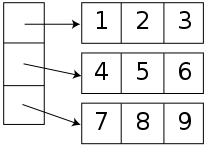
    Many languages support only one-dimensional arrays. In those languages, a multi-dimensional array is typically represented by an Iliffe vector, a one-dimensional array of references to arrays of one dimension less. A two-dimensional array, in particular, would be implemented as a vector of pointers to its rows. Thus an element in row i and column j of an array A would be accessed by double indexing (A[i][j] in typical notation). This way of emulating multi-dimensional arrays allows the creation of ragged or jagged arrays, where each row may have a different size — or, in general, where the valid range of each index depends on the values of all preceding indices.

    This representation for multi-dimensional arrays is quite prevalent in C and C++ software. However, C and C++ will use a linear indexing formula for multi-dimensional arrays that are declared as such, e.g. by int A[10][20] or int A[m][n], instead of the traditional int **A.

    Index types

    Array data types are most often implemented as array structures: with the indices restricted to integer (or totally ordered) values, index ranges fixed at array creation time, and multilinear element addressing. This was the case in most "third generation" languages, and is still the case of most systems programming languages such as Ada, C, and C++. In some languages, however, array data types have the semantics of associative arrays, with indices of arbitrary type and dynamic element creation. This is the case in some scripting languages such as Awk and Lua, and of some array types provided by standard C++ libraries.

    Array index range queries

    Some programming languages provide operations that return the size (number of elements) of a vector, or, more generally, range of each index of an array. In C and C++ arrays. They do not support the size function, so programmers often have to declare separate variable to hold the size, and pass it to procedures as a separate parameter.

    Elements of a newly created array may have undefined values (as in C), or may be defined to have a specific "default" value such as 0 or a null pointer (as in Java).

    In C++ a vector supports the store, select, and append operations with the performance characteristics discussed above. Vectors can be queried for their size and can be resized. Slower operations like inserting an element in the middle are also supported.
    READ MORE - Filling an Array
     
    THANK YOU FOR VISITING